In development · first pilot at Brandeis University
Most software training teaches one app. Real work never uses one app.
Wazapod teaches workflows that cross applications — the survey tool into the spreadsheet into the visualisation, the CAD file into the slicer into the printer — and grades the result in the real software, not a simulation.
The gap
Nothing guides a learner across the seam between two applications
Interactive training platforms are good at one thing: walking somebody through a single application. The hand-off is the hard part, not the clicking — and it is the part no existing tool represents. Wazapod treats each hand-off as a step in its own right, and keeps track of the file that has to move across it.
- Survey tool
- Hand-off
- Spreadsheet
- Hand-off
- Visualisation
How it works
Five screens a learner actually sees
These are not mock-ups. Each image comes from the product itself, so it shows what a learner actually sees. The full page for each is linked under it.
-
Route the learner before teaching them anything
Three questions decide which path through the kata they get. A route that assumes you can install software when you cannot is worse than no route at all — so a managed Chromebook and an admin-rights Mac are sent different ways, not given the same instructions and a shrug.
Kata: the prescribed pattern you practise.
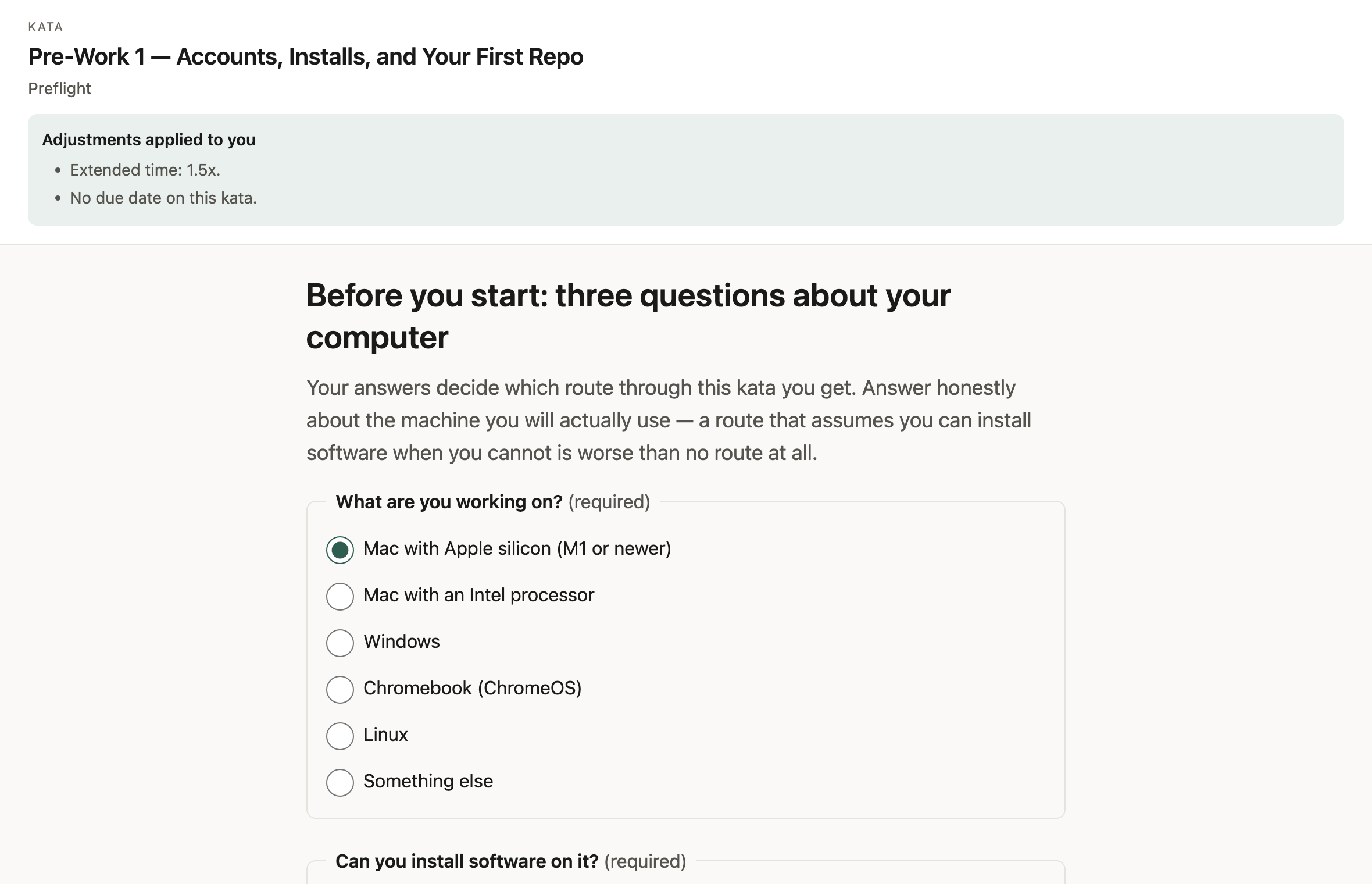
Preflight · open the full page -
Verify the setup before anything is graded
Nobody discovers a broken install an hour in. The learner runs one command, sees what the correct output looks like, and confirms it — and the steps that wait on a human somewhere else, like an education-benefits review, are started early and tracked separately rather than blocking the lesson.
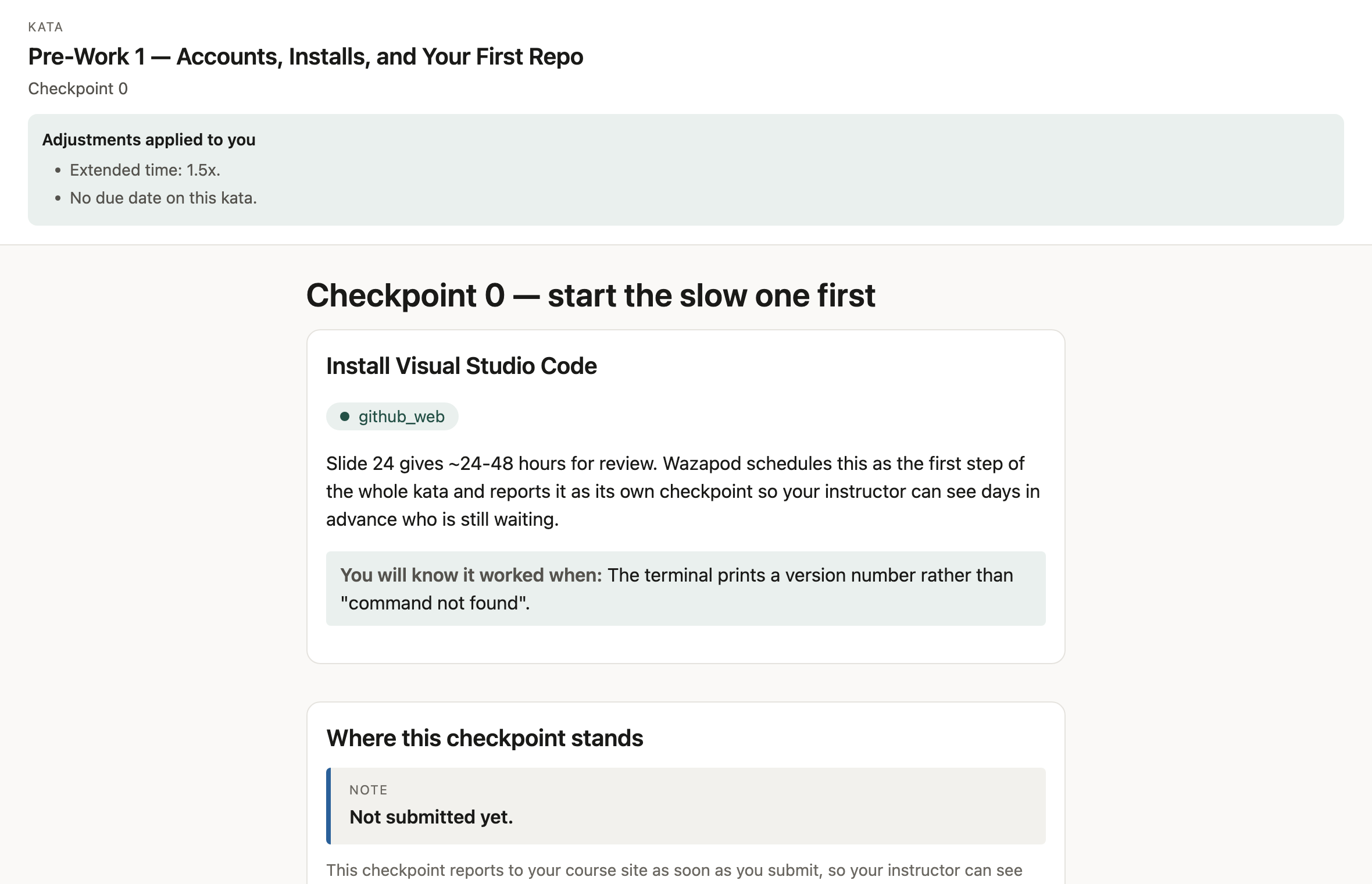
Checkpoint 0 · open the full page -
Make them retrieve it before they try it
One ungraded question at the boundary between watching and doing, and the label says it is ungraded because that is the only text a learner is guaranteed to read. Guessing wrong here is cheaper than guessing wrong in the real application, and the feedback leads with what the correct result looks like rather than with a verdict.
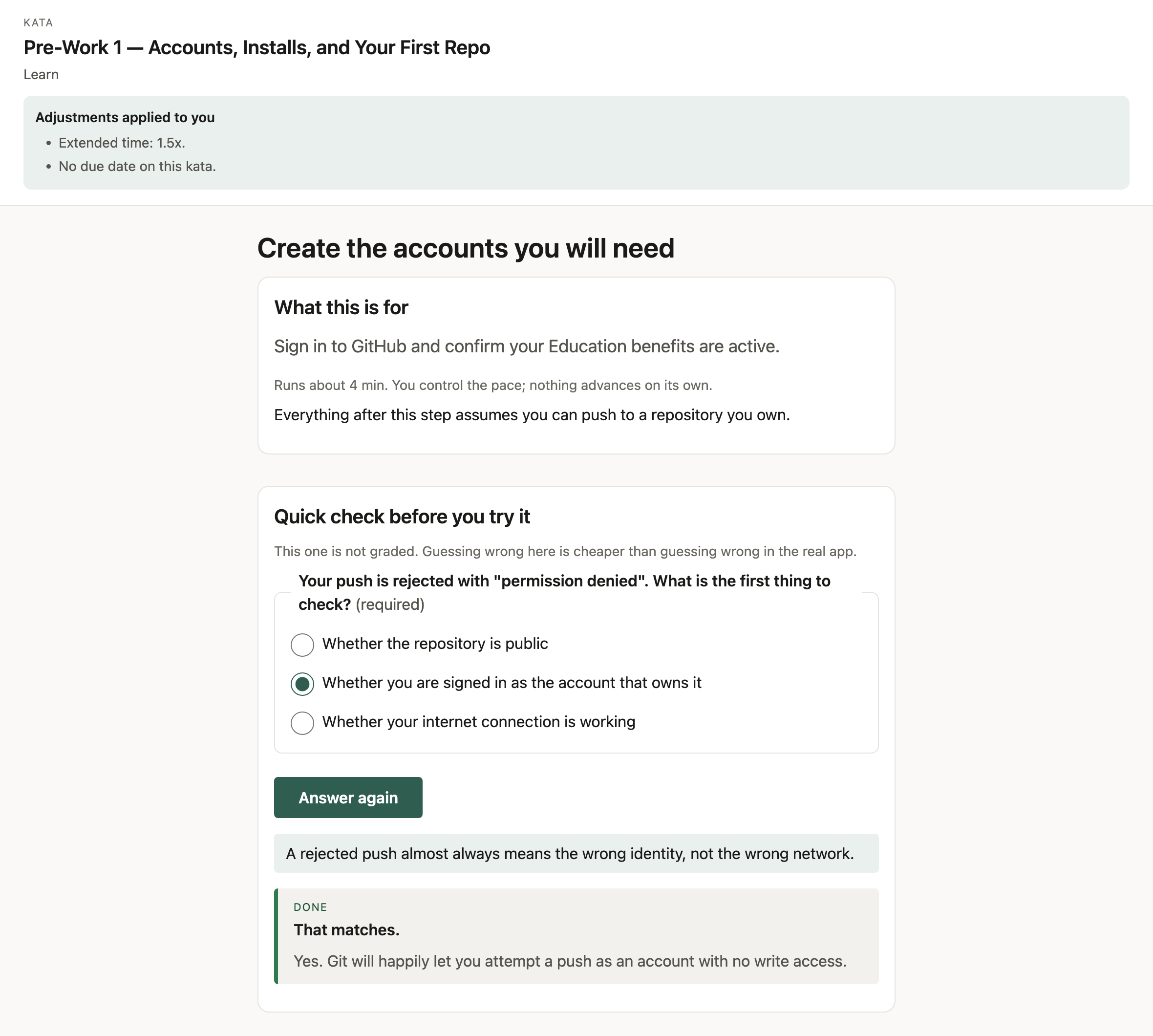
Learn · open the full page — cropped past the walkthrough frames, which come from an ingested screen recording and are empty in this example -
State the hand-off as a contract, with per-learner values
What has to be true is written down: what it was made in, where it lands, the file itself, and the state it has to be in. The values are assigned per learner, so somebody else's answer does not fit your work — that is what makes a second run-through practice rather than replay.
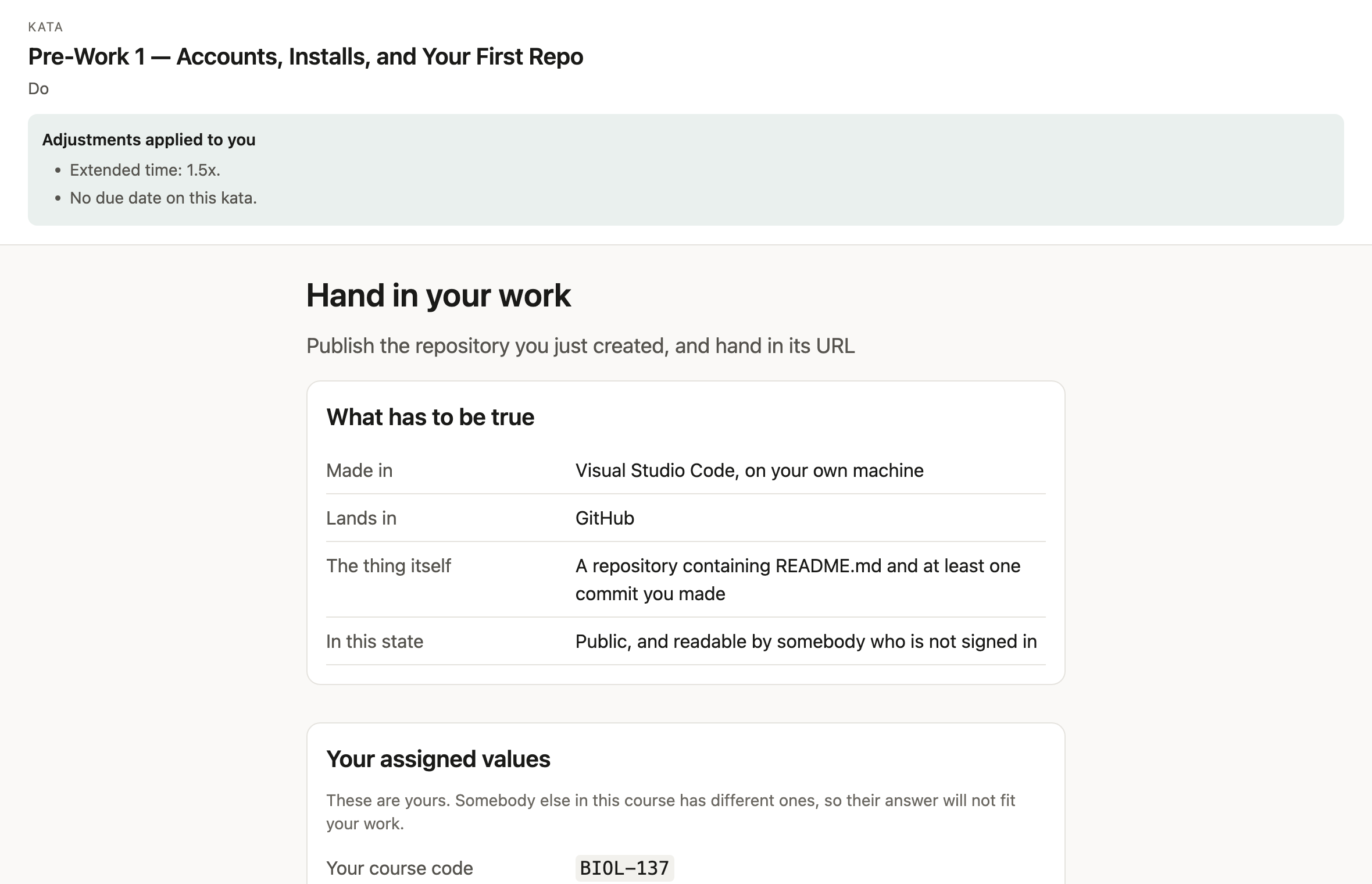
Hand-off · open the full page -
Return evidence, not a number
Every criterion records what was checked, what was expected and what was actually found, in words a learner can act on or dispute. There are three verdicts, not two: a criterion the scorer could not evaluate is marked could not be checked, earns nothing, costs nothing, and sends the mark to a person instead of quietly scoring zero.
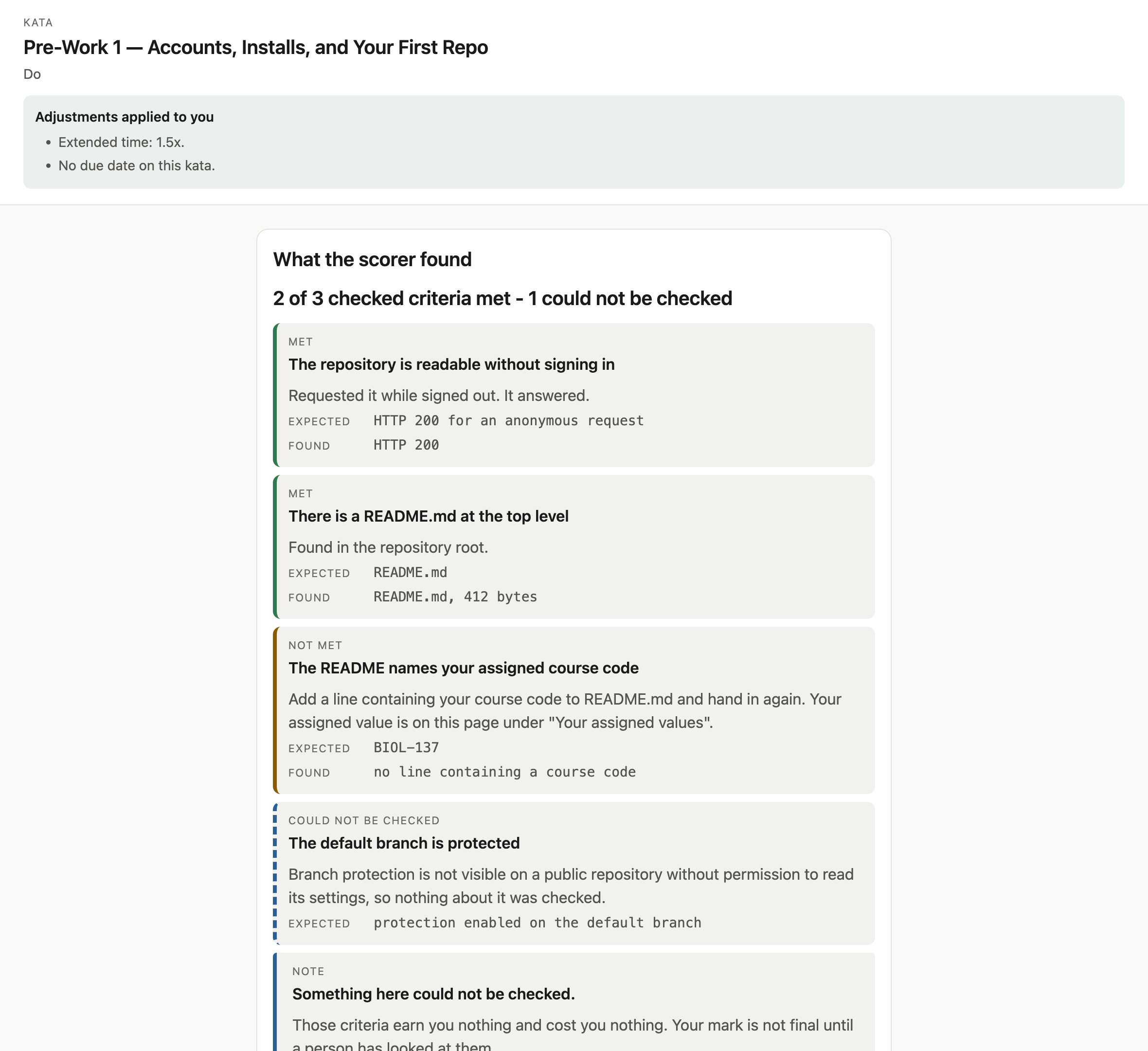
Evidence · open the full page


Ingestion
Start from the material you already have
Nobody has time to author a course from scratch. Wazapod ingests what exists and turns it into something a learner can practise against. Every claim keeps the colour of where it came from, all the way to the learner's screen — the colours below are the ones the product uses.
All four work today: a deck, a PDF handout, a screen recording, and whatever the material leaves unsaid.
From a deckTraining decks
Working now
Upload a PowerPoint and it becomes a lesson: sections from the slides, and steps quoted from what each slide said — including the speaker notes, where a teaching deck usually keeps the real procedure. Every step traces back to where it came from, and you review what was read before anybody learns from it.
From a recordingScreen recordings
Working now
Upload a screen recording. It is cut where the screen actually changed, a real screenshot is captured for each part, and the narration is transcribed — so each sentence you said becomes a step, at the moment you said it.
From a personWritten guides
Working now
Upload a PDF handout and it becomes the same structured lesson a deck does — sections from its headings, steps quoted from what it says, and a gap wherever it states an outcome without the steps to reach it.
UnresolvedWhatever the material implies
Working now
Anything the source implies but never states becomes an explicit gap. It is never filled in by guessing. A lesson cannot be published with an unresolved gap left in it.
Progress
Five states, in one order
Competence is not a percentage. Each thing a learner can do sits in one of five states and moves through them in order — no points, no streaks, no leaderboard, and nothing that rewards speed over getting it right.
- 01Not startedNothing attempted yet.
- 02AttemptedTried, not yet working.
- 03PracticedDone more than once.
- 04ReadyReady for the real thing.
- 05MasteredDone unaided, and it held.
The pattern you practise is a kata. One pass at it is a run-through. The real technique it was for is 技 — waza. Those three words are the whole vocabulary; there are no belts and no ranks.
In your course site
It launches from the course and the grades come back
A learner clicks the assignment in Moodle or Canvas and lands straight in the work, and their marks come back on their own without anybody copying a spreadsheet. A learner needs no Wazapod account and no password — there is no profile to create, because the launch itself is the identity.
Accommodations are applied, not requested
Extended time, extra attempts and date overrides come from one place, and graded mode stays unavailable until somebody has reviewed the roster. Confirming that nobody needs an adjustment is a valid answer.
Ordering, not deadlines
A kata is gated on what has to be true before it, not on a date. Practice that has to happen in a fixed week is scheduling, not teaching.
Learner work stays put
No learner-identifying data and nothing a learner makes leaves the server this runs on.
Roadmap
Ground covered, and where it goes next
Where things stand, and what is being built. There are no dates: Wazapod paces a learner by what they have finished rather than by a deadline, and the roadmap follows the same rule.
Working now
Turn a deck into a lesson
Upload the slides you already teach from. You get a lesson students work through a step at a time, and you check it before anyone sees it.
Runs inside your course site
Students start it from Moodle or Canvas like any other assignment, and their marks come back on their own. Nothing to install, no spreadsheet to copy.
Written handouts too, not just decks
A PDF handout becomes a lesson the same way a deck does. Most courses have more handouts than decks.
Screen recordings become lessons
Cut where the screen changed, a screenshot per part, and your narration transcribed into steps at the timecode you said them.
Setup sorted before the session
Students get their software working ahead of class, at their own pace, on whatever computer they own.
See who is stuck, and on what
Days before you teach, not while you are teaching — with what to cover first, based on what the group actually got wrong.
Real feedback on what they hand in
Each thing you asked for, answered separately, with the reason — instead of one number nobody can learn from.
Adjustments that just apply
Extra time and reduced-distraction settings are applied for the students who need them, without anyone having to ask each time.
Being built next, in this order
A real screenshot for every step
Captured by running the workflow, rather than left blank.
Editing a lesson after publishing
With a record of what changed and what needs looking at again.
Grades that count
Once a reviewer has signed the lesson off, step by step.
Guidance over the application itself
The step shown against the real software, not beside it.
Status
Where it actually is
The short version of the roadmap above.
- Working today
- A PowerPoint becomes a lesson a learner can work through inside their course site, and the instructor sees who is stuck before the session. Itemised under ground covered above.
- In progress
- Correcting a drafted step after publishing rather than only at publish time. And the reviewer sign-off pass that lets a lesson count toward a grade — everything scores as feedback until that has happened, which is a gate rather than a setting.
- Coming soon
- Describing a screenshot, which a recording cannot do for itself — so the frames it captures are stored for review rather than attached to a step. On-screen guidance overlays, the AI tutor, and third-party video lessons.
- Accessibility
- A published accessibility report that names the problems still outstanding rather than claiming there are none. Text and background colours are checked automatically for legibility, in both light and dark, and anything that fails stops the release.